
No — Google Analytics 4 does not show keyword search volume, and it never did. Search volume is a market-demand estimate, and GA4 measures what happened on your own site. The two questions live in different tools, and the confusion usually comes from two things that sound alike: the Search Console link inside GA4, which does add query data, and a genuine volume figure, which only comes from a demand source such as Keyword Planner. This page separates the three tools so you stop looking for a number that was never going to appear.
There is no search-volume field in GA4
Search volume answers "how many people search for this term in a market?" GA4 answers "what did visitors do on my property?" Its reports are built from your own events and sessions, so unless you import an external volume figure, there is nothing for GA4 to show. The report that people point to as proof otherwise is the Search Console report, which appears only after you link the two products — and even then it carries Search Console metrics, not volume.
What the Search Console link adds — and what it does not
The official Connect Search Console to Google Analytics help describes two reports. "Google Organic Search Queries" shows the search queries and their associated Search Console metrics for the linked property, and "Google Organic Search Traffic" shows landing pages with both Search Console and Analytics metrics. Neither is a volume report.
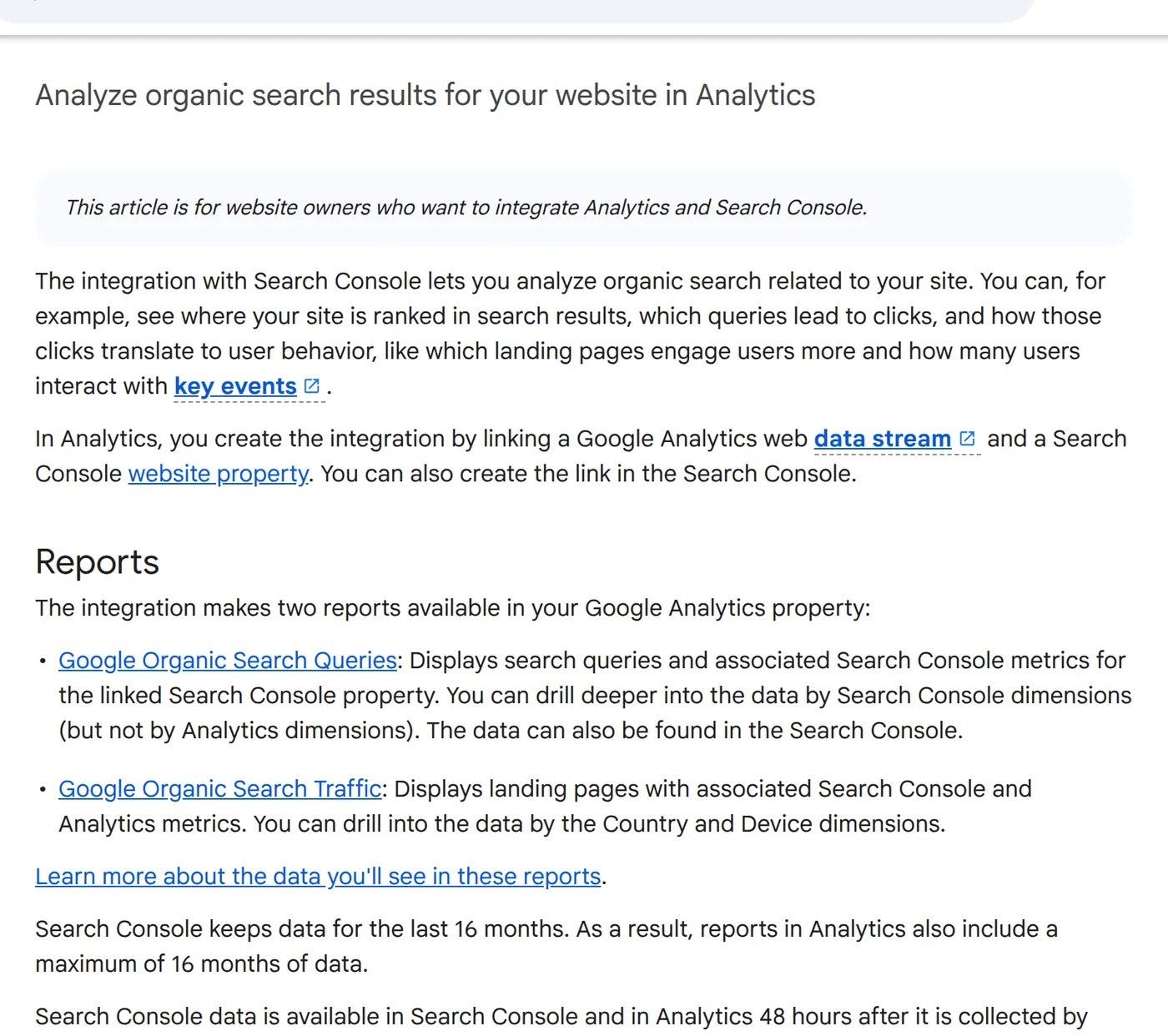
A few limits matter in practice: the linked data appears in Analytics up to 48 hours after Search Console collects it; the Search Console collection is unpublished by default and must be enabled from Library; and you need the Editor role in Analytics plus verified ownership in Search Console to create the link. You also link one web data stream to one Search Console property.
Where search volume actually comes from
Volume is an estimate produced by a demand tool, not a count of people. The closest free source is Google Keyword Planner. Its official help explains the key caveats: "average monthly searches" covers a keyword and its close variants, reflects the month range, location and network you selected, and is rounded. Historical search volume is shown only for exact matches. Competition and bid ranges describe the advertising auction, not organic ranking difficulty.
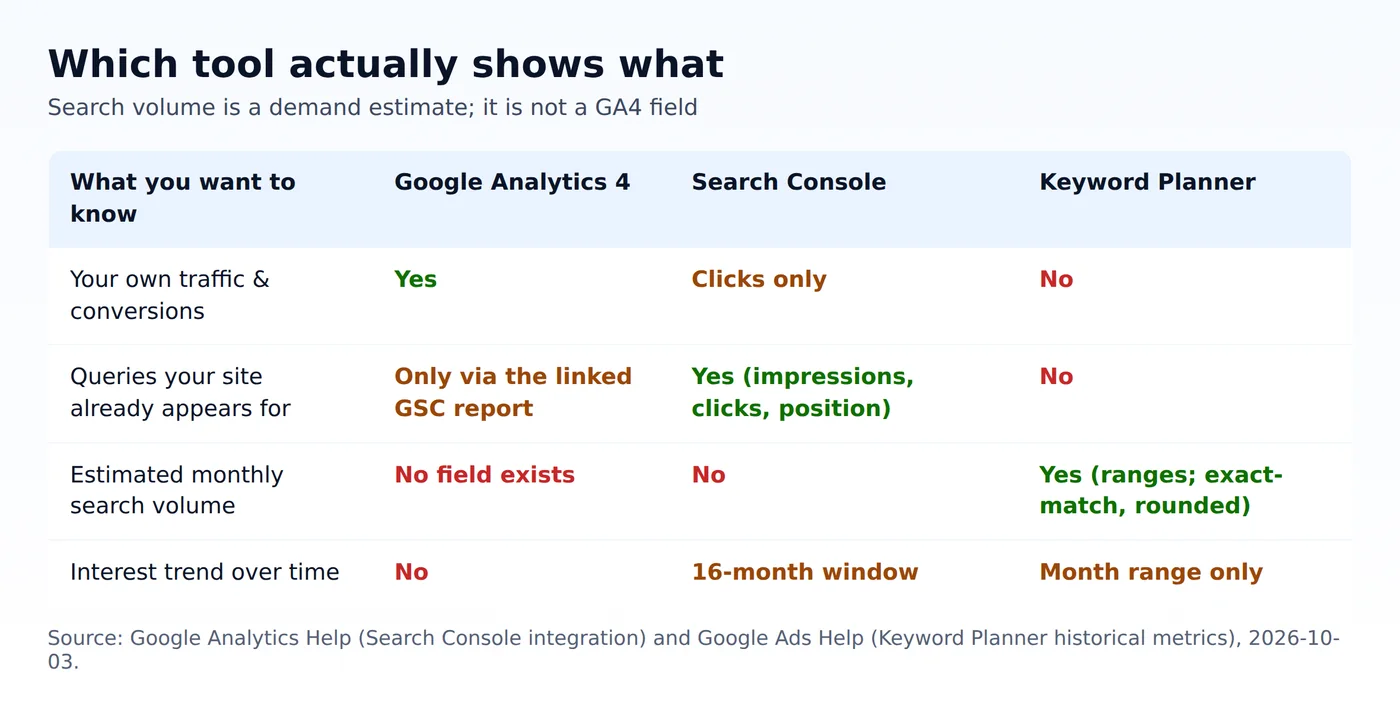
Google Trends is the third piece, and it is deliberately relative: it returns interest on a 0–100 scale for a chosen geography and timeframe, not a count. Use Trends to see direction and seasonality, not size.
Why "not provided" still appears
Even with the Search Console link, GA4 will not show a keyword for every organic session. Search Console reports queries by property, while GA4 reports sessions by landing page; the join is not one-to-one, and some traffic — privacy-limited, app, or non-Google — has no query to show. You will also see "(not set)" in Analytics dimensions where no value was collected. None of this is a bug, and none of it is volume. It is the boundary between a query report and a traffic report.
A short, repeatable workflow
- Connect Search Console and publish the Search Console collection in GA4 so you can see queries alongside behaviour.
- Export the queries your site already appears for from Search Console. These are real demand you have proven relevant — a better seed list than any volume tool.
- Put the shortlist into Keyword Planner for a demand band, remembering it is a rounded range and exact-match only.
- Use Trends to check direction and seasonality before you commit to a publishing schedule.
- Keep GA4 for what it is good at: whether the pages that earn those queries actually engage and convert.
How this differs from keyword research and cross-checking
This page exists to kill one specific misconception: that GA4 is a volume tool. Two neighbouring English guides cover the wider job. What tools show Google keyword search volume, trends and competition maps the four different questions people ask a "keyword tool." How to check and cross-check keyword search volume when tools disagree is the procedure for when two sources give different numbers. Read those for research; read this when you are staring at GA4 wondering where the volume column is.