Have you noticed that in Search Console, some keywords have consistently soaring impressions, but the click-through rate is abnormally low?
The exposure opportunity is there, but users just “took one look and left”
The problem often lies in the “first impression” on the search results page: the title isn’t attractive enough, the description lacks persuasion, or the content doesn’t match the user’s real needs.
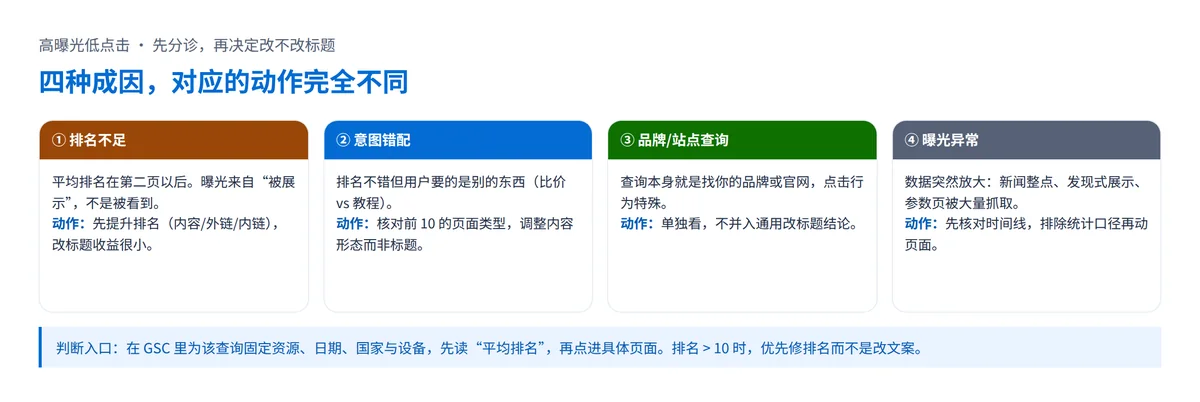
A more insidious situation is when keywords appear to have high impressions, but the actual ranking may be on the second page or beyond, causing users to never see your link.
This article takes a practical SEO perspective, without complex theories, and directly provides reusable templates and data metrics to help you convert “ineffective exposure” into real clicks.

High Impressions ≠ High Ranking
High impressions ≠ users actually seeing your link! For example, a keyword with 1,000 impressions per day might just be because it’s searched frequently, and your page only appears at the bottom of the second page (users rarely paginate).
This “false exposure” misleads the optimization direction, wasting traffic opportunities for nothing.
The “Pitfall” of Impressions: Search Volume ≠ Effective Impressions
- Search Console counts the total number of times a keyword appears on the search results page. Even if your link is at the very bottom of the second page and users never saw it, it’s still counted as one impression.
- Case Study: Keyword “how to do SEO” has 5,000 impressions, but the average ranking is 12th (second page), with actual clicks likely under 50.
Check the Real Ranking: Look at “Average Position”
In Search Console, filter for that keyword, click to enter the detail page, and find the “Average Position” value (the smaller the number, the higher the ranking):
- Ranks 1-4: Click-through rate usually above 5% (ideal state);
- Ranks 5-10: Click-through rate around 2%-5% (need to optimize title attractiveness);
- Beyond Rank 10: No matter how high the impressions, click-through rate can hardly exceed 2% (prioritize improving ranking).
Optimization Direction: Climb the Rankings First, Then Chase Clicks
If the average position is > 10, it means the page authority is insufficient, and blindly optimizing title click-through rate is meaningless. You need to:
- Improve Content Quality: Cover more long-tail keywords, add practical cases and data charts;
- Strengthen Backlink Building: Acquire at least 500+ backlinks with domain voting power (such as independent site backlinks);
- Optimize Page Load Speed: Ensure mobile load time is < 3 seconds (can use PageSpeed Insights for testing).
Make Users “Can’t Help But Click”
Even if your page climbs to the first page of search results, if the title reads like an “instruction manual,” users won’t bother clicking! For example, two adjacent ranked links:
- Title A: “2023 Mobile Photography Tips Introduction”
- Title B: “Take Big Screen Photos! 3 Tips to Double Your朋友圈 Likes”
90% of users will choose B, because the title directly hits the pain point and offers an incentive. Your title isn’t a “keyword report” written for search engines, but a “hook” to attract users.
First Don’t Make Mistakes, Then Talk About Creativity
Length Control: Keep the title tag within 50-60 characters (exceeding this will be truncated, showing “…”).
- Bad Example: “2023 Latest iPhone Photography Tips Compendium | From Beginner to Professional | Apple Phone Photography Tutorial” → Too long and repetitive.
Keywords First: Place core keywords in the first 1/3 of the title to avoid users missing the key point after truncation.
- Revision: “iPhone Photography Tutorial | 2023 Latest Tips, Beginner to Pro in 3 Days” → Highlights keywords, shortens length.
Give Users a “Reason to Click”
Add Action Commands: Use verbs like “Download/Get/Guide” to imply direct benefits after clicking.
Case Comparison:
Original Title: “Free SEO Tools Recommendation”
Optimized: “Download Now! 10 Free SEO Tools List I’ve Personally Tested”
Create Urgency:
- Limited-time type: “Limited Offer | Register and Get 50 Yuan Coupon”
- Quick-results type: “Learn in 3 Minutes | Even Beginners Can Create Cinematic Vlogs”
Differentiated Competition: Compared to competitor titles, highlight your unique advantages.
Scenario: Most competitor titles are “WordPress Website Building Tutorial,” can be changed to “No Code Needed! Build a WordPress Website in 1 Hour (Templates Included)”.
Testing Method: Validate Title Effect with Data
- A/B Testing Tools: Use Google Optimize to set different titles for the same page, run for 1-2 weeks, and choose the version with higher click-through rate.
- Search Console Comparison: After modifying the title, observe click-through rate changes over 3-4 weeks (clicks ÷ impressions). If improvement is < 10%, continue optimizing.
- Third-Party Tool Assistance: Use CoSchedule Headline Analyzer to analyze title sentiment scores (recommend > 70 points) to ensure the tone is positive and attractive.
The “Ad Copy” in Search Results
The description tag (Meta Description) is the “final touch” before users click, but many people treat it as a keyword stuffing machine, writing it dryly. For example:
- Bad Example: “SEO Tutorial, SEO Tips, SEO Training, SEO Tools Recommendation” → Reads like a list generated by a robot, completely emotionless for users.
- Optimized Example: “Beginner’s Pitfall Guide! 3 Low-Cost SEO Tips That Quadrupled My Website Traffic in 1 Month” → Sounds like a friend sharing experience, click desire skyrockets.
The description tag isn’t a direct factor in SEO ranking, but it determines whether users are willing to click. Writing it well is like placing a “free ad” in search results.
Avoid Mechanical Stuffing, Speak Human Language to Move People
Wrong Approach: Treating the description tag as a keyword stuffing ground (example: “Phone Repair, Phone Repair Services, Apple Repair, Screen Replacement Repair”).
Correct Approach: Answer two questions in natural language:
- User Pain Point: “Phone screen black and won’t turn on?”
- Your Value: “10-Year Master Repair Technician’s 3-Step Emergency Method, 80% of Problems You Can Fix Yourself!”
Highlight the Solution, Strengthen Authority Endorsements
Templates You Can Use Directly:
Pain Point + Solution: “Limited Budget? 5 Practical Camping Gear Under 100 Yuan, Even Beginners Can Play Professionally”
Quantified Results: “95% Student Feedback: This Excel Formula Template Saves 2 Hours Daily”
Add Trust Elements:
Experience Endorsement: “10-Year Designer’s PPT Layout Secrets”
Qualification Certification: “ISO Certified Enterprise | 5000+ Customer Cases Nationwide”
Length Control and Formatting Details
Character Count Recommendation: Keep within 150-160 characters (approximately 25-30 Chinese characters), avoid truncation.
- Too Long Bad Example: “This tutorial provides detailed explanation of how to learn Photoshop from scratch, including basic tool usage, layer management, color correction techniques, poster design practical cases…” → Key information gets truncated.
Avoid Repeating the Title: If the title already contains “iPhone Photography Tutorial,” the description can supplement: “Includes 100 Preset Filters + Shooting Location Recommendations, Must-Have for Mobile Photographers”.
Testing and Optimization: Don’t Guess, Use Tools to Verify
- Search Results Preview Tools: Use tools like SISTRIX or SEO META IN 1 CLICK to simulate how your title and description display on the search results page (especially on mobile).
- Search Console Data Feedback: After modifying the description, observe click-through rate changes over 2-3 weeks. If a page’s click-through rate remains below 2%, rewrite it.
- A/B Testing (Advanced): Set multiple versions of descriptions for the same page, and use Google Optimize or third-party SEO tools (like Ahrefs) to select the version with the highest click-through rate.
Content Matching Search Intent
Have you encountered this situation? Users click into your page through a keyword, but leave within 3 seconds—not because the content is poor, but because they wanted a “car repair tutorial” and what they got was an ad for “selling car repair tools”!
This is a typical “content and search intent mismatch.”
Search engines will push your page to more people, but users feel the “product doesn’t match the description,” directly leading to high bounce rates, low click-through rates, and even algorithm demotion.
3 Quick Ways to Determine Search Intent Types
Informational: Users want to learn knowledge or solve problems (like “how to water succulents” or “what to do if iPhone is lagging”).
- Content Suggestion: Detailed tutorials, step-by-step breakdowns, FAQ compilations.
Commercial: Users want to compare products/services (like “best robot vacuum 2023” or “Shanghai wedding photography rankings”).
- Content Suggestion: Comparison reviews, price analysis, user review evaluations.
Navigational: Users want to find a specific website/function (like “WeChat official download” or “Zhihu login entrance”).
- Content Suggestion: Direct links + operation guidance (less fluff, give them the entrance directly).
Manual Verification: Lock Down User Real Needs in 5 Minutes
Steps:
- Manually search the target keyword on Google;
- Check the content type of pages ranked in the top 10:
- If 80% are comparison reviews, it means users need commercial decision content;
- If all top 10 are tutorial videos, even if your product page ranks high, it will be hard to get clicks;
Mimic the content format of high-ranking pages, but provide deeper or differentiated information.
Adjustment Strategy: Small Changes Can Also Quickly Match Intent
Scenario 1: Users need tutorials, but your page is a product page.
- Add a “Solution Section” at the top of the product page
(example: Add “3 Steps to Solve Formaldehyde Exceeding Standards | Includes Professional Testing Methods” on the air purifier product page).
Scenario 2: Users need commercial comparisons, but your content looks too much like an ad.
- Add real user reviews, competitor parameter comparison tables (generate with Excel then screenshot to prevent plagiarism).
Scenario 3: Users need navigation entrances, but your page is a long article.
- Use bold text at the beginning of the article to indicate direct links (example: “>>> Click Here to Go Directly to Official Website Download”).
Tool Assistance: Batch Analyze Keyword Intent
- Free Method: Use the “People also ask” section in Google search results to mine related user questions.
- Paid Tools: SEMrush‘s “Keyword Intent” function directly labels keyword types (commercial/informational/navigational).
- Warning: Avoid covering multiple intents with the same piece of content (like stuffing product ads into tutorials), otherwise user churn rate will skyrocket.
Seize “Special Display Positions”
When your link is “lonely” on the search results page with only a title and description, users can easily swipe past it.
But if your page gains a star rating, FAQ question box, or even directly displays a step list, the click-through rate could double!
These “special display positions” are called rich snippets (Rich Snippets), and they act like “ad spots” in search results, instantly catching users’ eyes, and can even make a #5 ranked link get more clicks than a #1 ranked ordinary link.
Low-Cost Configuration of Structured Data
Applicable Scenarios and Code Types:
- Product/Service Pages: Use
Productstructured data to display prices and ratings (example: 4.5-star rating + 200 reviews); - Tutorials/Guides: Use
HowToorFAQto directly display steps or Q&A on search results (example: “Items needed: 1. Scissors 2. Glue…”); - Articles/Blogs: Use
ArticleorBreadcrumbto display publish time and author authority information.
Operation Steps:
- Use Google’s official tool Structured Data Markup Helper to generate code;
- Embed the code in the
<head>section of the page HTML; - Use Structured Data Testing Tool to verify if it takes effect.
Secrets to Competing for “Featured Snippets” (Position 0)
Content Requirements:
- Answer the user’s question directly (e.g., “How to reduce swelling quickly?” → Immediately give “Ice pack + elevate affected area” in the first paragraph);
- Use clear subheadings for layering (e.g., “## First Aid Steps ## Long-term Care”);
- Keep paragraphs concise (no more than 150 characters), avoid complex terminology.
Case Comparison:
- Ordinary content: “There are many ways to reduce swelling, and the choice depends on the specific situation…”
- Featured Snippet optimized version: “3-Minute First Aid Method: ①Ice pack for 10 minutes → ②Apply anti-inflammatory ointment → ③Elevate affected area above the heart.”
Monitor Effectiveness: Don’t Let Traffic Slip Away Quietly
Search Console Data: In the “Performance” report, filter by “Search Appearance” to check the impression volume and click-through rate of rich snippets.
- Target Benchmark: Rich snippet click-through rates are usually 30%-50% higher than ordinary results (if below this range, check content relevance).
Third-Party Tool Monitoring: Use Ahrefs or SEMrush to track competitors’ rich snippet display situations and target-optimize missing modules.
Continuous Iteration: After adding each type of rich media, observe data for 2-4 weeks, and prioritize keeping modules with click-through rate improvements > 20%.
Solving the problem of “high impressions but low clicks” is essentially about changing users from “seeing” to “wanting”.
Starting today, pick one keyword with the lowest click-through rate and optimize it following the steps in this article. Validate the results with data after 30 days.