
If you need the titles of twenty or two hundred pages in a spreadsheet — for a content audit, a migration check or a competitor overview — copying them one by one is the slow way. A short local script does it in one pass and writes a clean CSV. This article gives a real, runnable example and, just as importantly, the limits of doing it politely and legally.
What "extracting titles" can mean
- The
<title>tag — what search engines show as the clickable line (before Google rewrites it). - The H1 — the visible main heading, which often differs from the title tag.
- The meta description — useful for spotting missing or auto-generated descriptions.
A single-page browser extension or an online form can already fetch one title (that is what most "title extractor" tools do). The difference here is doing it in bulk, from a list you control, into a file you can sort and filter.
A local script that reads a URL list and writes a CSV
Install two libraries and save the script below:
pip install requests beautifulsoup4
import csv
import time
from urllib.parse import urljoin

import requests
from bs4 import BeautifulSoup

# One URL per line. These can come from a sitemap, an export, or a manual list.
with open("urls.txt", encoding="utf-8") as f:
    urls = [line.strip() for line in f if line.strip()]

HEADERS = {
    # Identify your script honestly. Do not impersonate a browser you are not.
    "User-Agent": "TitleAuditBot/1.0 (+https://example.com/bot)"
}

rows = []
for url in urls:
    try:
        r = requests.get(url, headers=HEADERS, timeout=15, allow_redirects=True)
        soup = BeautifulSoup(r.text, "html.parser")

        title = (soup.title.string or "").strip() if soup.title else ""
        h1_tag = soup.find("h1")
        h1 = h1_tag.get_text(strip=True) if h1_tag else ""
        desc_tag = soup.find("meta", attrs={"name": "description"})
        desc = (desc_tag.get("content") or "").strip() if desc_tag else ""

        rows.append({
            "url": url,
            "final_url": r.url,
            "status": r.status_code,
            "title": title,
            "title_length": len(title),
            "h1": h1,
            "description": desc,
        })
    except Exception as e:
        rows.append({"url": url, "final_url": "", "status": "error",
                     "title": "", "title_length": 0, "h1": "", "description": str(e)})

    time.sleep(1)   # be gentle: one request per second

with open("titles.csv", "w", newline="", encoding="utf-8-sig") as f:
    writer = csv.DictWriter(f, fieldnames=[
        "url", "final_url", "status", "title", "title_length", "h1", "description"])
    writer.writeheader()
    writer.writerows(rows)

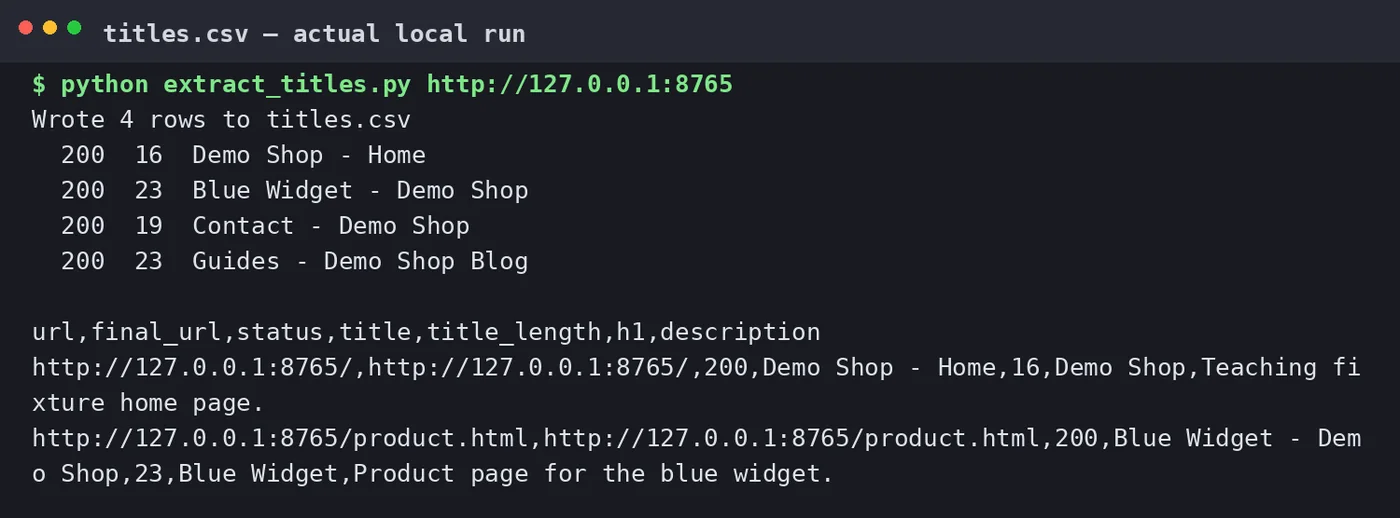
print(f"Wrote {len(rows)} rows to titles.csv")
The utf-8-sig encoding makes the file open cleanly in Excel with non-English text. The time.sleep(1) is not decoration: it keeps the crawl small and courteous.
Where the URL list comes from
- A sitemap. Fetch
/sitemap.xml, collect the<loc>values, and feed them in. This is usually the cleanest source. - A Search Console export. The Pages report can be exported and its URL column reused.
- A manual list. For a competitor check or a small migration, twenty URLs in a text file is enough.
What the script will miss
- JavaScript-rendered titles. If a site builds its title in the browser, the raw HTML may have a generic one. Catching those needs a headless browser (for example Playwright), which is far slower and heavier — only do it for sites that actually need it.
- Google's displayed title. Google sometimes rewrites the title link it shows. Your script reads the page's own
<title>, which is a different thing from what a search result displays. - Anything behind a login or a block. A 403 or a CAPTCHA is not something to work around with disguises; if a site does not want automated access, respect that and use its sitemap or an export instead.
Doing it responsibly
- Check robots.txt. It tells you which paths automated clients should leave alone.
- Keep the rate low. One request per second is plenty for an audit and will not look like an attack.
- Do not build a public scraping service. A page that fetches arbitrary URLs on demand for anyone is an abuse vector and a liability. Run the audit on your own pages, or on pages you have a reason and a right to check.
- Store only what you need. Titles and headings are fine; do not harvest personal data or full article text you have no right to keep.
Turning the CSV into a checklist
Once you have the file, sort by title_length to find titles that are empty or absurdly long, filter status codes to catch broken URLs, and compare the title column with the h1 column to find pages whose heading and title disagree. That comparison alone usually surfaces a handful of real fixes.
Guangsuan (光算) does this kind of technical and content audit as part of its Google SEO service. If you also need to pull the visible body text rather than just the titles, continue with extracting the main content of a page.
Sources
- Google Search Central — Sitemaps overview
- Google Search Central — Robots.txt introduction
- Requests documentation · Beautiful Soup documentation
The code is a local teaching example, not a hosted service. Adjust the user agent to identify your own script and keep request volumes low.