
When you pull text from a page, you usually get more than you asked for: the menu, the cookie banner, the sidebar, the footer, and the same "related posts" block that appears on every page of the site. If you are building a dataset, feeding an AI system, or checking whether two pages are duplicates, that boilerplate is not harmless — it can make every page look similar. This article shows how to keep the real content and drop the rest, and why the naive approach fails.
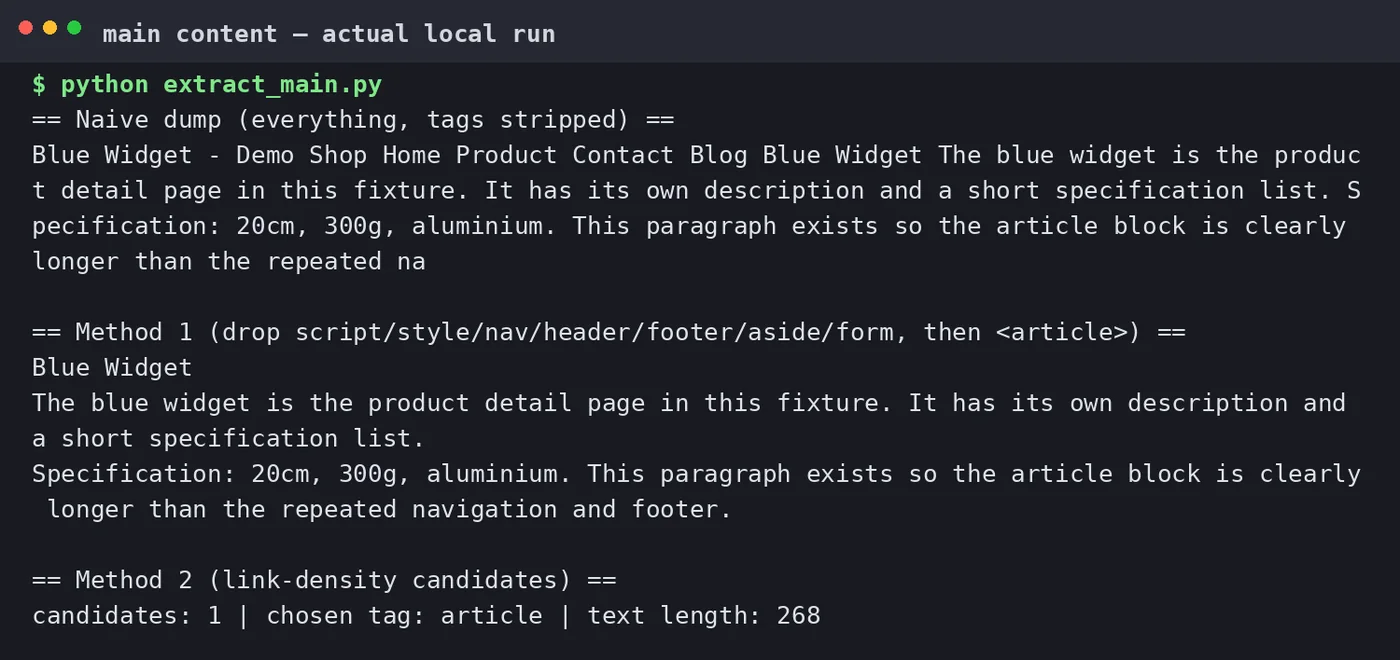
Why a simple text dump is not enough
The quickest method is to strip every tag and keep the text. It works for a single article and falls apart at scale, for three reasons:
- It includes the chrome. Navigation, footer, cookie notice and sidebars come along with the article.
- It includes repeated blocks. On a blog, "related posts" and author boxes repeat on hundreds of pages.
- It can include the wrong content. Comment sections, ad labels and recommendation widgets add noise that is not part of the article.
Extracting the article from one page by hand is what a browser reader-mode does. Doing it across many pages needs a repeatable rule.
Method 1: use the page's structure
Modern pages usually mark the main content with a semantic element: <main>, <article>, or a container with a role. If the target site uses them, extraction is trivial and reliable.
import requests
from bs4 import BeautifulSoup

HEADERS = {"User-Agent": "ContentAuditBot/1.0 (+https://example.com/bot)"}
r = requests.get("https://example.com/some-article", headers=HEADERS, timeout=15)
soup = BeautifulSoup(r.text, "html.parser")

# Drop the parts that are never article content.
for tag in soup(["script", "style", "nav", "header", "footer", "aside", "form"]):
    tag.decompose()

main = soup.find("article") or soup.find("main") or soup.body
text = main.get_text("\n", strip=True) if main else ""
print(text[:500])
The important part is the decompose() loop. Removing nav, header, footer and aside before reading the text eliminates most boilerplate in one line each.
Method 2: score candidate blocks when there is no semantic markup
Older themes and many CMS templates do not use <article>, so you need a heuristic. Two signals work well together:
- Text density. A real article block has a high ratio of text to links and tags. Navigation has many short links and little prose.
- Link density. If most of the text inside a block is link text, it is probably navigation, not content.
A practical rule: walk the block-level elements, keep the ones whose text length exceeds a threshold (say 200 characters) and whose link density is below about 0.5, then take the longest such block as the article.
def link_density(tag):
    text_len = len(tag.get_text(strip=True))
    if text_len == 0:
        return 1.0
    link_len = sum(len(a.get_text(strip=True)) for a in tag.find_all("a"))
    return link_len / text_len

candidates = [el for el in soup.find_all(["div", "section", "article"])
              if len(el.get_text(strip=True)) > 200 and link_density(el) < 0.5]

# The largest qualifying block is usually the real content.
article = max(candidates, key=lambda el: len(el.get_text(strip=True))) if candidates else None
Method 3: identify boilerplate by comparing pages
When one page is not enough, use the whole site. Extract every text block from several pages, normalise them, and count how often each block appears. Blocks that show up on most pages — the footer, the "subscribe" box, the related-links list — are boilerplate by definition, even if they sit inside the main container.
- Fetch a sample of pages from the same template (for example, 20 articles).
- Split each into text blocks (paragraphs or list items).
- Count duplicates across pages. Blocks appearing on more than, say, 80% of pages are chrome.
- Remove those blocks from every page before analysis.
This is the most robust method for duplicate detection and for building a clean dataset, because it learns the template instead of guessing it.
Static HTML versus a rendered page
The methods above read the HTML the server returns. That is fast and cheap. It fails when the content only appears after JavaScript runs:
| Static HTML (requests) | Rendered page (headless browser) | |
|---|---|---|
| Speed | Very fast, many pages per minute | Seconds per page |
| Finds JS-built content | No | Yes |
| Cost and complexity | Low | High (browser, memory, timeouts) |
Check first whether the text is in the initial HTML — "view source", not "inspect". If it is there, use the static method and skip the browser entirely. Only reach for a headless browser on sites that genuinely render the article client-side.
Checking the result
Do not trust the extractor blindly. For a sample of pages, compare the extracted text with what a reader sees:
- The first paragraph of the output should be the first paragraph of the article, not the cookie notice.
- The output should not repeat across pages of the same site.
- Navigation words ("Home", "Categories", "Read more") should be rare.
A false sense of success here is worse than a small mistake: a whole dataset built on boilerplate-laden text gives skewed results that are hard to trace back.
The boundary to respect
Extraction is a technical task; whether you may do it is a separate question. Respect the site's robots.txt and terms, keep request rates low, identify your client honestly, and do not republish full text you have no right to. Building a public "paste any URL" extraction service is a different project with real legal and abuse exposure — this is a local tool for pages you have a reason to process.
Guangsuan (光算) uses this kind of pipeline when auditing and organising content for clients as part of its Google SEO service. To collect just the titles first, see extracting page titles to CSV.
Sources
- Google Search Central — JavaScript SEO basics
- Google Search Central — Robots.txt introduction
- Beautiful Soup documentation
The code is a local teaching example. Extend the boilerplate step with the site-comparison method before you rely on the output for automated decisions.