
You cannot export Google Ads data to JSON from the interface, because there is no JSON button. The native download offers spreadsheet and XML formats, and XML is not JSON. If you genuinely need JSON — for a script, a data pipeline, or an app — there are two realistic routes: query the Google Ads API through its REST interface, which returns JSON, or land the data in a warehouse and export JSON downstream. This page covers both, plus the permissions you will need and a fixture you can run locally to see the shape before you touch a live account.
The interface has no JSON button
This is worth stating plainly because a lot of "export to JSON" advice skips it. Google Ads Help, in Create, save, and schedule reports from your statistics tables, lists the download formats you get when you click the download icon above a table and choose Download: "Available formats include Excel CSV, TSV, PDF, XLSX, XML, and Google Sheets." JSON is not one of them.
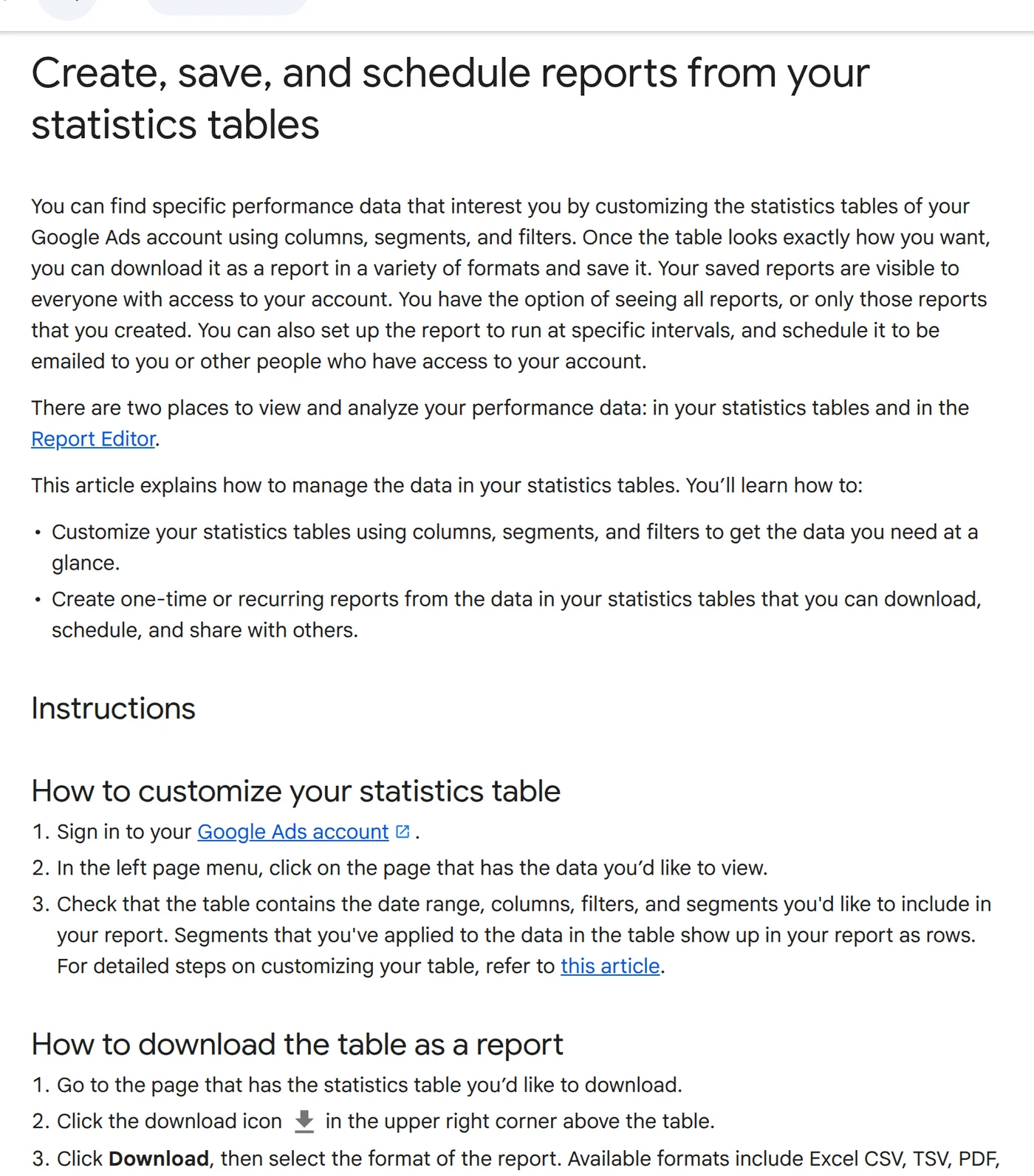
XML is the closest native format and is easy to confuse with JSON, but they are different languages with different audiences. If a downstream tool insists on JSON, converting XML or CSV to JSON is a local programming step, not an export option.
| Format | Good for | Not ideal for |
|---|---|---|
| Excel CSV / TSV | Spreadsheets, quick analysis, scripts that read delimited text | Nested or typed data |
| XLSX | Human reports with formatting | Automated pipelines |
| XML | Systems that already parse XML | Anything expecting JSON |
| Sharing a fixed snapshot | Any further processing | |
| Google Sheets | Several people on one live file | Strict version control |
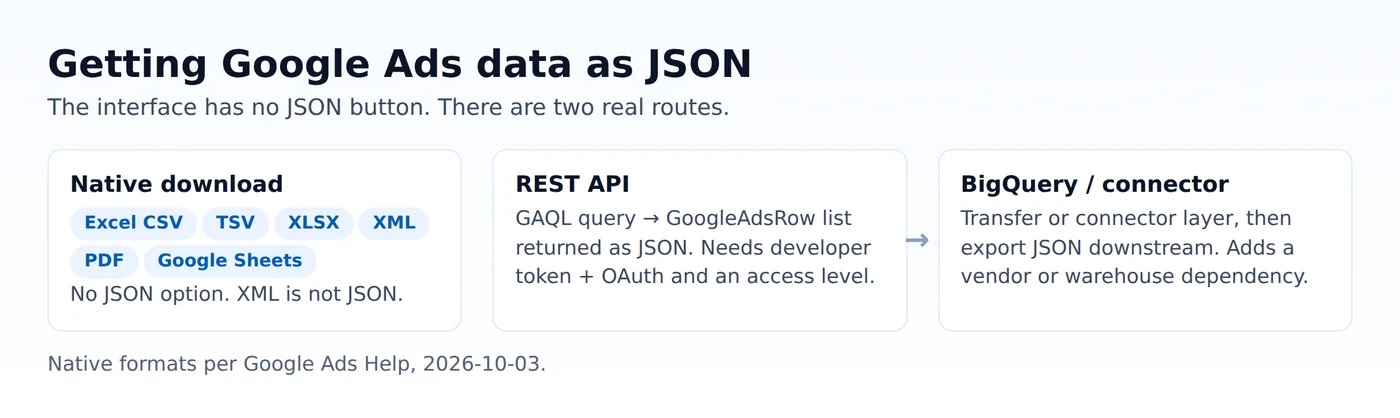
Route 1: the REST API returns JSON
The Google Ads API supports two interfaces — gRPC and REST. Most official client libraries use gRPC, which exchanges protocol buffers; the REST interface uses JSON representations of the same resources, documented in JSON mappings. So "Google Ads as JSON" is really "call the REST API directly."
Queries are written in the Google Ads Query Language (GAQL), and a GoogleAdsService query returns a list of GoogleAdsRow instances, each carrying the attributes, metrics or segments you selected. The same query idea you build as a report in the interface translates into a GAQL string.
Before any of it works you need two things people underestimate:
- A developer token. Its access level determines what you can do and how many operations you can run. Google documents four access levels: Test Account Access (15,000 operations a day, test accounts only), Explorer (2,880 operations a day against production accounts), Basic (15,000 operations a day) and Standard (unlimited). Your project starts at Test Account Access and you apply to increase it. "Permissible use" decides which features, such as reporting or keyword research, you are allowed to call.
- OAuth and a client. The API authenticates as a user or a service account. Keep the developer token and credentials in a secured file or secret store; never commit them, and never paste them into a public report.
We do not print a live API call here, because we will not fabricate an authorisation flow we have not run for you. What we can show honestly is the JSON shape a query produces.
A runnable fixture: what the JSON looks like
The script below does not call the API and contains no credentials. It shows the field names a GAQL query returns and prints valid JSON, so you can see the target shape and wire up your own downstream parsing before you have access.
import json

# Field names mirror a GAQL query such as:
#   SELECT campaign.id, campaign.name, metrics.clicks,
#          metrics.conversions, metrics.cost_micros
#   FROM campaign WHERE segments.date DURING LAST_30_DAYS
fixture_rows = [
    {"campaign.id": "1234567890", "campaign.name": "Brand-Exact",
     "metrics.clicks": 412, "metrics.conversions": 18, "metrics.cost_micros": 26140000},
    {"campaign.id": "1234567891", "campaign.name": "Generic-Long-Tail",
     "metrics.clicks": 903, "metrics.conversions": 11, "metrics.cost_micros": 88750000},
]
text = json.dumps(fixture_rows, indent=2)
print(text)
print(f"rows={len(fixture_rows)}  json_valid={isinstance(json.loads(text), list)}")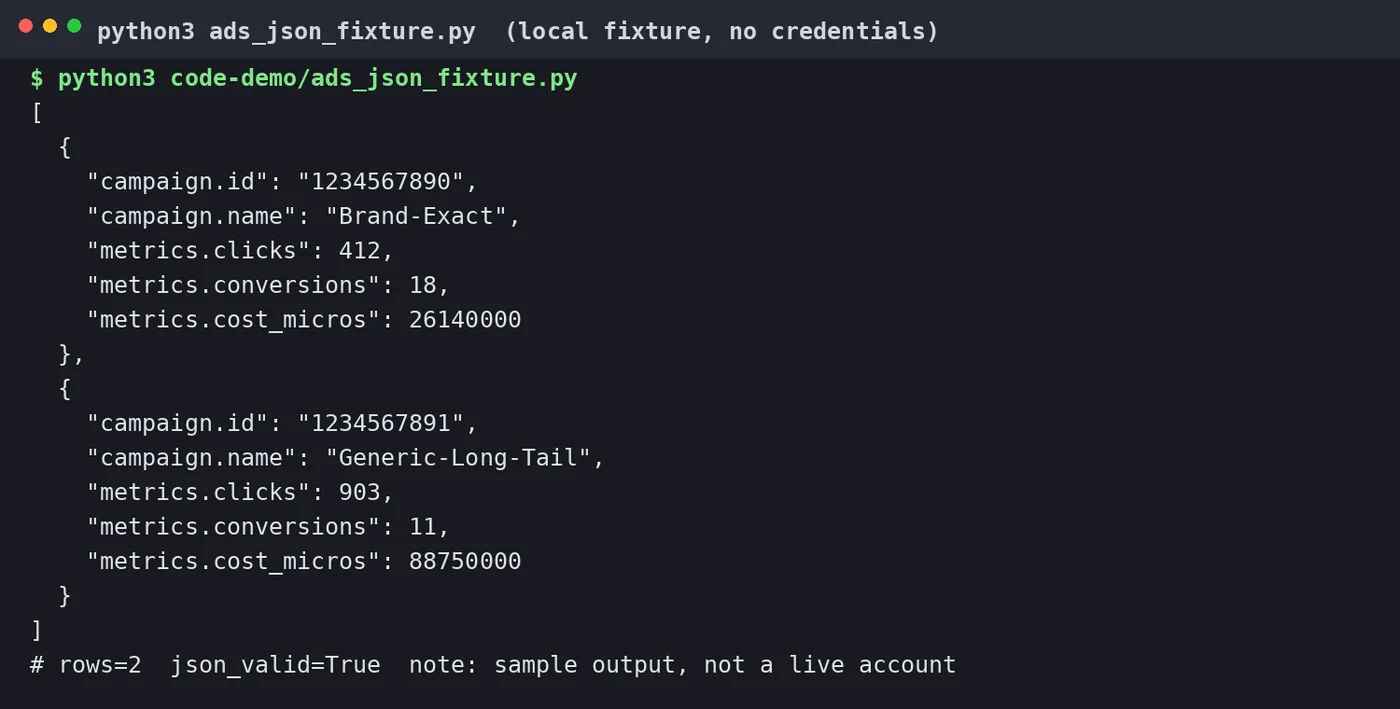
Two things to note in the shape. Metrics such as cost arrive in micros, so divide by one million for currency. And the keys use dotted names (campaign.name, metrics.clicks) because they map directly to the GAQL fields you selected.
Route 2: a warehouse or connector layer
If clicking through the API is more engineering than you want, the data can land somewhere else first — a BigQuery transfer, or a reporting connector — and you export JSON from there. This is a legitimate route, but it adds a dependency: a vendor, a project, or a scheduled transfer that you now maintain. Decide whether the convenience is worth an extra moving part; for a one-off file, converting a CSV to JSON locally is often faster and has no vendor attached.
What breaks regardless of route
- Date basis. An export is only as good as the range and time zone behind it. Record both with the file.
- Conversion basis. Click-time and conversion-time reporting put the same conversion in different periods; pick one and keep it consistent.
- Zero rows. Report Editor can drop rows whose clicks and impressions are zero, so a "missing" keyword may simply be a zero row.
- Currency and micros. Cost is in micros and in the account currency. Never compare two accounts' raw numbers without normalising both.
How this differs from the general export guide
How to export data from Google Ads (and read dates and conversions correctly) is the "which report, and how do I read it" guide — date ranges, conversion columns, the general download workflow. This page is narrower: it answers only the JSON question, defines the two routes, and gives you the shape to code against. Read #495 first if you are new to exports; read this when a tool is asking you for JSON specifically.