
After a migration or a CMS cleanup you usually end up holding a spreadsheet of old URLs. The question that matters is not "did I write a redirect rule" but "does every one of these old URLs still return something sensible to a human and to Googlebot". This is the verification pass: take the exported list, request each URL, and record the status code, the number of redirect hops and the final landing page. It is separate from the migration master checklist, which decides the mapping in the first place.
Everything below runs against a throwaway local server, so you can rehearse the method before pointing it at production. Production testing should use low concurrency and a timeout; a few hundred URLs are trivial, but never let a checker hammer a live site.
What the export should contain, and what the report must add
A usable old-URL export is a plain list, one URL per line, in the same absolute form the old site used (scheme, host, path, query). Common sources: the Search Console "Pages" export for the last 12–16 months, server access logs, the previous XML sitemap, and a CMS or database dump of old permalinks. Merge them and de-duplicate exactly — do not strip query strings or trailing slashes yet, because those differences are often the exact bug you are hunting.
For each old URL the report should capture:
- old_url — as exported.
- http_status — the status of the first response for that URL.
- redirect_count — how many 3xx hops before a final response.
- final_url — where it actually lands.
- final_status — 200, 404, 410, 500 or a loop marker.
- note — a short verdict you can filter on, e.g. "one hop ok", "chain>1", "dead", "wrong locale", "points to homepage".
Run it for real before you trust any tool
You do not need a paid crawler to do this. A short script that opens each URL without auto-following redirects, reads the Location header, and repeats is enough. The transcript below is an actual run against a local fixture with deliberately varied routes: a clean one-hop redirect, a three-hop chain, a temporary 302, a hard 404, a 301 that ends on a 410, and a redirect loop.
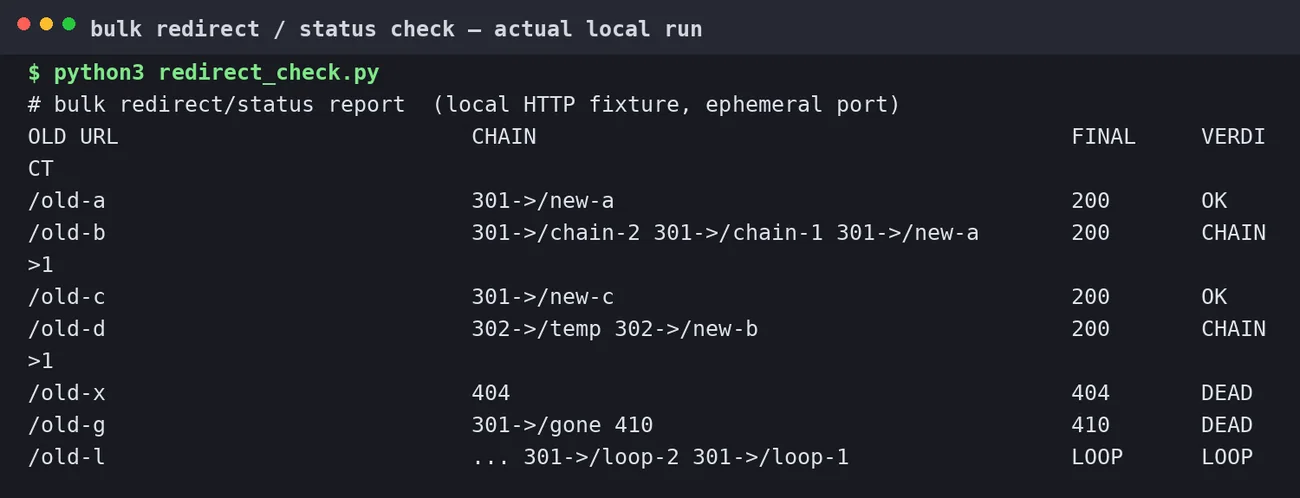
redirect_check.py on this machine, 2026-10-02. The fixture, not a client site, produced every row.Reading the table is the whole skill. A single 301 -> 200 is fine. A chain of two or more 301s is not an error, but it is worth collapsing to one hop: every extra hop is another chance for a crawler or a slow mobile connection to give up. A 302 on a permanent move tells Google the change is temporary, so the old URL can stay in the index. A 404 or 410 on a URL that still has external links or search demand is a real loss. A LOOP is always a bug to fix first.
Judgement calls the raw status code will not make for you
Status codes are necessary but not sufficient. Three checks catch most of the damage:
1. Does it land on the right page, not just any page?
A redirect to the homepage returns 200 and looks "healthy" in a status-only report while destroying the relevance of the old link. Flag every final URL that is the homepage or a generic category when the old URL was a specific product or article. Column-level filtering ("final_url == /") makes this visible.
2. Does the final page agree with itself?
Fetch the final URL and read its rel="canonical". If the final URL is /new-page but its canonical points to /old-page (or to a third URL), you have created a redirect into a page that immediately signals a different canonical. That is a classic reason Google keeps showing the wrong URL. This overlaps with why Google picks a different canonical, so check both together.
3. Is the response stable?
Re-run a sample after a day. Redirects that depend on geolocation, device, cookies or a CDN edge can differ between runs. Some servers also answer HEAD but not GET, or return 200 to HEAD and 404 to GET; verify with a real GET on a sample rather than trusting a HEAD-only tool.
A repeatable loop, not a one-off
- Freeze the export and record its source and date.
- Run the checker with low concurrency; export to CSV.
- Split the results into three buckets: clean, fixable (chain, temporary, soft 404, wrong target), and broken (loop, 5xx, dead with demand).
- Fix the mapping in the redirect layer, then re-run the same CSV. Compare counts, not vibes.
- Keep the before/after CSV with the change log so the next person can see what was verified and when.
Where this stops and the migration checklist begins
This pass tells you whether the old URLs resolve correctly today. It does not decide the redirect map, and it does not replace the pre-migration content inventory. If the source list itself is incomplete — for example you only exported the top 1,000 rows — the report can be clean and still miss half the problem. Treat the size of the export as a known limitation and state it in the report.
When the status layer is clean, move on to the language layer: if a redirect crosses into a localized section, confirm that the target's hreflang annotations still resolve to 200 pages. For a site built on this type of work, see the Google SEO service and the B2B website build service; if the old site used WordPress, the redirect and permalink behaviour is covered in the WordPress hosting and speed service notes.
Sources
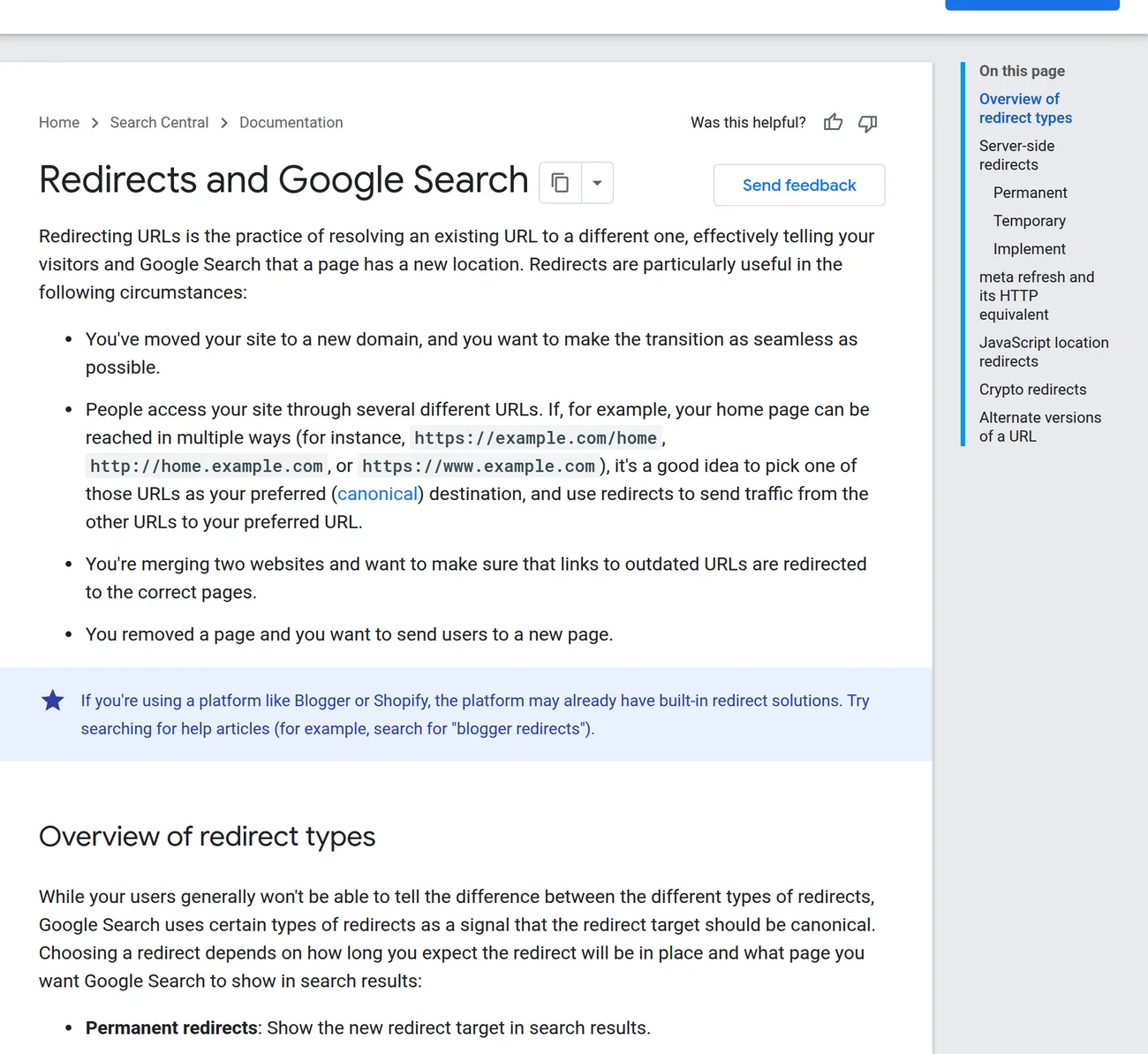
- Redirects and Google Search — Google Search Central (permanent vs temporary, server-side redirects, alternate names).
- Fix canonicalization issues — Google Search Central (canonical vs redirect conflicts).
- Local fixture and checker:
redirect_check.py, run 2026-10-02 on this machine.