
“Google sandbox” is a popular SEO label for a frustrating pattern: a new site is crawled or even indexed, but it receives few impressions, few clicks, or unstable rankings for competitive queries. The label can be useful as shorthand, but it should not be presented as an official Google ranking system with a fixed duration or an unlock trick. Google’s public documentation describes crawling, indexing, serving, quality assessment, ranking systems, and the time it can take for changes to be reflected—not a guaranteed sandbox countdown.
What is the Google sandbox? (direct answer)
The Google sandbox is a nickname, not a Google product. It describes the observation that brand-new sites often sit with few impressions or unstable rankings for competitive queries while Google builds enough crawl coverage, index quality and relevance signals to trust them. Google does not publish a sandbox mechanism, a fixed duration, or a button to exit it. The practical treatable causes are crawl problems, indexing problems, thin or overlapping content, and unrealistic keyword targets — each with a different fix, which is why "waiting" is rarely the whole answer.
What people usually mean by Google sandbox
When SEOs say a site is “in the sandbox,” they usually mean one of four things:
- The site is not fully discovered or crawled yet.
- Important pages are crawled but not indexed, or Google selected a different canonical URL.
- Pages are indexed but not considered useful or relevant enough for the target queries.
- The site appears for long-tail or branded queries but not for competitive commercial terms.
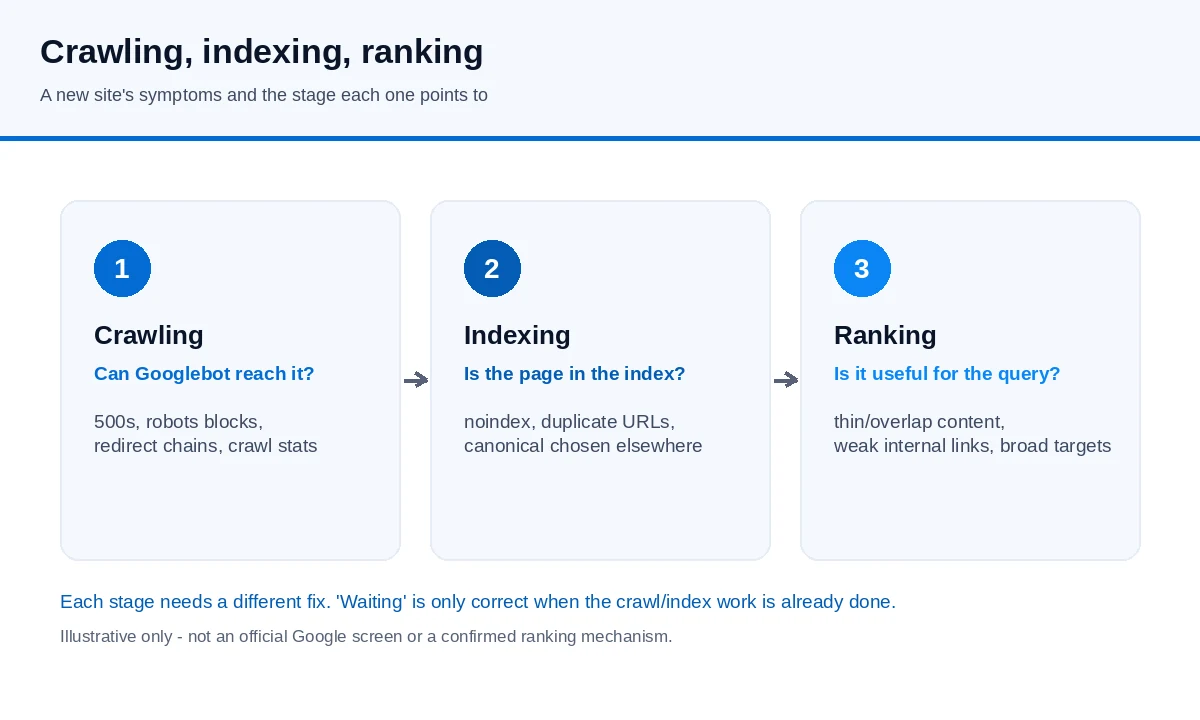
Those situations can feel like one mysterious filter, but they require different fixes. A crawl problem needs technical diagnosis. An indexing problem needs canonical, quality, and duplication review. A ranking problem needs better relevance, content usefulness, internal linking, page experience, and stronger evidence that users can trust the site.
How long does it last?
There is no official sandbox length. Google’s SEO Starter Guide says changes can take time to be reflected: some may take a few hours, while others could take several months, and site owners generally need to wait a few weeks before assessing whether changes helped. Google’s traffic-drop guidance also notes that it may take months before systems determine that a site is producing helpful content in the long term.
That does not mean every new site must wait several months. Some pages are discovered and shown quickly when the content is uniquely useful, the site is technically clean, and there is enough demand for the topic. Other pages may remain weak for a long time because they copy existing answers, target overly broad keywords, or have no clear internal and external discovery paths.
A better question is not “When will the sandbox end?” but “Which stage is limiting this site right now?”
Diagnose the stage before changing strategy
Use Google’s Search process as the diagnostic frame:
- Crawling: Can Googlebot access the pages? Check server errors, robots.txt, blocked resources, redirects, and crawl stats.
- Indexing: Are the pages indexed, excluded, duplicated, canonicalized elsewhere, or blocked by noindex? Use the URL Inspection tool and Page indexing report.
- Serving and ranking: Are indexed pages relevant and helpful for the queries you want? Search Console can show whether impressions exist, which queries trigger them, and whether clicks follow.
Do not rely on a rank tracker alone. Google warns that third-party SEO tools do not have access to its internal ranking data and cannot guarantee performance. Search Console is the first-party source for how your verified property performs in Google Search.
Common reasons a new site looks “sandboxed”
Several ordinary causes can produce the sandbox feeling:
- Thin topical footprint: the site has only a few pages and does not yet answer the surrounding questions users have.
- Overlapping pages: many posts target similar phrases without adding distinct value, making it hard for Google and users to identify the best page.
- Weak internal links: important pages are not linked from navigation, hubs, or related articles.
- Generic content: the page summarizes what competitors already say, without original explanation, examples, evidence, or practical judgment.
- Technical instability: slow responses, intermittent 5xx errors, redirect chains, blocked rendering resources, or inconsistent canonical tags.
- Unrealistic keyword targets: a new domain tries to rank immediately for broad, high-competition head terms before earning relevance for narrower queries.
None of these require inventing a secret ranking timer. They require steady improvement and measurement.
How to move from waiting to improving
A practical “exit” plan should focus on actions that help users and make the site easier to understand:
- Publish complete pages for real intents. Each important page should answer the main question clearly, cover necessary conditions and exceptions, and avoid exaggerated claims.
- Build topic hubs. Link service pages, problem guides, comparisons, and support pages so users can move from diagnosis to decision.
- Improve evidence. Add primary sources for technical statements, real screenshots where appropriate, clear authorship or company information, and honest limitations.
- Strengthen snippets. Use clear titles and meta descriptions that match the page. If impressions exist but clicks are weak, this may be a visible bottleneck.
- Fix crawl and index signals. Remove accidental noindex, repair broken internal links, stabilize canonical tags, and ensure Google can render the same main content users see.
- Review data by query and page. Watch whether impressions grow for relevant long-tail queries before expecting competitive commercial rankings.
Backlinks and promotion can help discovery and reputation when they are earned or placed in genuinely relevant contexts, but they are not a magic escape hatch. Google’s ranking systems use many signals, including systems that understand content, links, freshness, quality, spam, and reliability. A single tactic cannot override weak usefulness or technical confusion.
What to report to stakeholders
For a new site, avoid promising a fixed date such as “the sandbox lasts 90 days.” A more accurate report is:
“The site is still building crawl coverage, index quality, and query relevance. We will track indexed pages, Search Console impressions, clicks, average position trends, and query groups. We will improve pages where data shows discovery without clicks, indexing without impressions, or impressions for the wrong intent.”
This wording keeps the focus on observable facts rather than an unverified mechanism. It also gives the team a practical path: fix what can be measured, publish what users actually need, and wait only where Google’s systems genuinely need time to recrawl, reassess, and serve the updated pages.
To check what a new page is actually waiting on, continue with the crawl, indexing and ranking diagnosis for a new website.
Primary references: Google: How Search works, Google SEO Starter Guide, Google Search ranking systems guide, and Debugging drops in Google Search traffic.